Network Operations Intelligence Platform

Know What Actually Changed in Your Network

Most outages start with a change. We watch every one.

Not just configurations — the full operational impact of network changes. ConfigGuard captures and correlates multi-plane network state — configurations, interfaces, routing tables, ARP, MAC, VLAN, and reachability — before and after each tracked change. The result: a deterministic, forensics-ready view of what actually changed across your network.

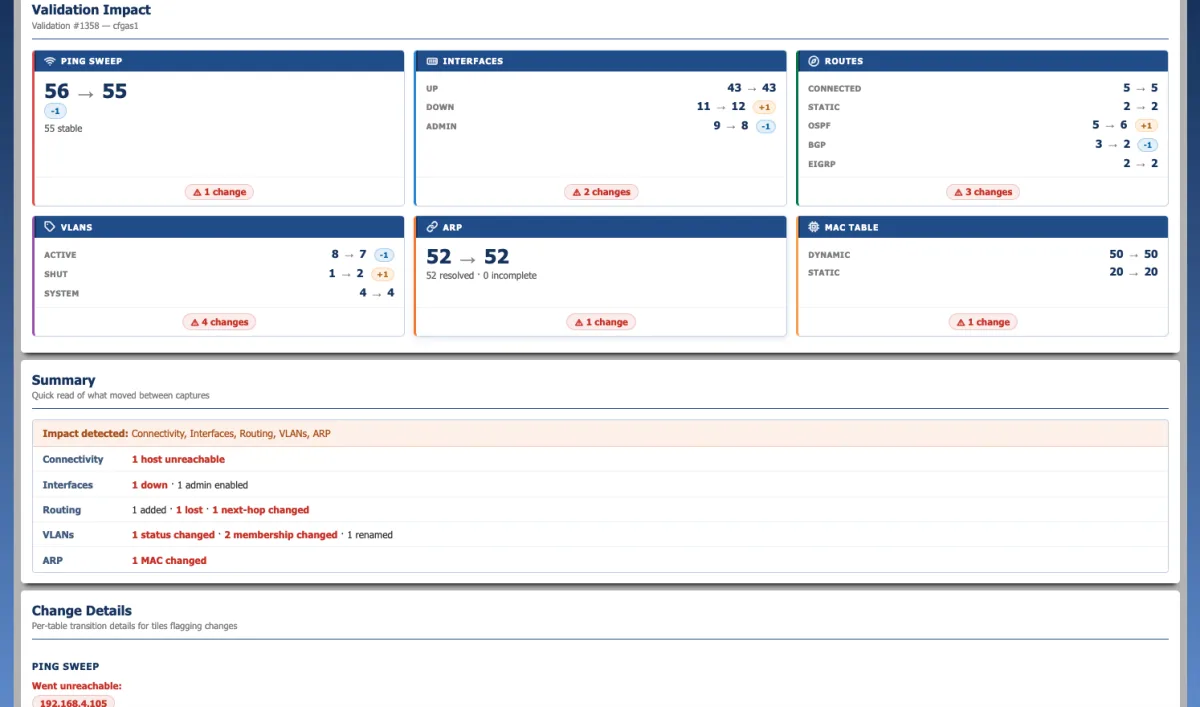
ConfigGuard change validation showing multi-plane impact across ping sweep, interfaces, routes, VLANs, ARP, and MAC tables for an L3 switch stack-member replacement
On-premise — no required cloud services Read-only data collection — no device modifications Built for mission-critical environments

Broad multi-vendor support via SSH — including

Cisco IOS / IOS-XE / NX-OS Arista EOS Juniper JunOS Palo Alto PAN-OS Fortinet FortiOS Extreme EXOS Aruba AOS/CX Ubiquiti UniFi and more

Why network changes break things

Most outages start with a change. Most of those changes weren't on anyone's radar.

The cause

  • Change-related
  • Hardware, environment, other

60–80% of network outages trace to a change.

Source: Uptime Institute, Annual Outage Analysis 2024

In practice the real share is closer to 9 in 10 once latent failures, blame redirection, and “I was just troubleshooting” state changes are included.

The kind of change

  • Shadow / unauthorized
  • Normal (CAB-approved)
  • Emergency
  • Standard (pre-approved)

~40% of impactful changes never enter the ticket system.

Source: Gartner research on shadow IT; industry surveys on CMDB completeness

Standard, Normal, and Emergency changes all leave a paper trail. Shadow changes don’t — and they’re the ones that wake people up at 3 a.m.

ConfigGuard captures both — the changes that go through your ITIL process, and the ones that don’t.

Why ConfigGuard Is Different

Most tools show configuration differences. ConfigGuard shows what actually changed in your network.

ConfigGuard correlates changes across the control plane and forwarding plane — configurations, interfaces, routing tables, ARP, MAC, and VLAN state — giving your team a forensics-ready view of what actually changed in the network. Every result is deterministic and explainable, traceable to actual device data — no black-box system.

Traditional Tools

  • Compare config files line by line
  • Show what was typed, not what it did
  • No visibility into interface, routing, ARP, or MAC impact
  • Changes discovered after something breaks

ConfigGuard

  • Captures critical network state before and after each tracked change
  • Diffs configs, interfaces, routes, ARP tables, MAC tables, VLANs
  • Identifies which routes, VLANs, and devices are affected — before users notice
  • Stakeholder notifications at every stage of the change lifecycle

Built for network engineers, NOCs, and infrastructure teams responsible for uptime, compliance, and change control — with a historical, forensics-ready timeline of network state for outage RCA, security review, and “what changed?” investigations.

What This Looks Like in Practice

A routine OSPF change on a core router. ConfigGuard captures critical state before the change window — 1,247 routes, 8,341 MAC entries, 412 ARP entries — then compares what actually came back after the work is complete.

Routing Table
1 route quietly dropped after maintenance
−1 Route
VLAN Mappings
1 VLAN missing from post-change state
−1 VLAN
ARP Table
89 devices dropped from ARP visibility
−89 Entries
Hosts Reachable
257 before → 189 after — 68 endpoints no longer responding
−68 Hosts

A single missing route and a dropped VLAN are easy to overlook in a config review — but they just took 68 hosts offline. Without ConfigGuard, you find out when users start calling. With ConfigGuard, the engineer sees the full blast radius before the change window closes — and rolls back before it spreads further.

Most outages aren't caused by unknown problems — they're caused by known changes that take too long to identify.

One avoided outage pays for ConfigGuard.

Network outages and failed changes routinely cost tens to hundreds of thousands of dollars in downtime, recovery effort, and operational disruption.

ConfigGuard reduces time to resolution by immediately showing what changed across configurations, routing, and network state — eliminating hours of manual correlation. The result: faster recovery, fewer escalations, and avoided incidents that can exceed $50K–$500K per event.

Core Capabilities

Four integrated capability areas built on a single network state engine — purpose-built for network operations, not bolted onto a generic monitoring tool.

Configuration Management & Change Assurance

Automated configuration collection and versioning. Pre/post change comparison. Maintenance window awareness, change tracking, and stakeholder notifications across the full lifecycle — from scheduling through completion or rollback.

Network State Correlation

Interfaces, routing tables, ARP, MAC, VLAN, and reachability tracking. Cross-device and cross-time correlation. See the operational impact of changes — not just the commands that caused them.

Discovery & Operational Visibility

SSH-based device discovery, port and neighbor mapping (CDP/LLDP), integrated IP tracking, topology maps, and operational dashboards for shift turnover and team awareness.

Security & Control

Four-tier role-based access control, TOTP multi-factor authentication, LDAP/Active Directory integration, modern authenticated encryption for stored credentials, and detailed audit logging.

Everything Network Ops Needs in One Platform

Configuration Repository

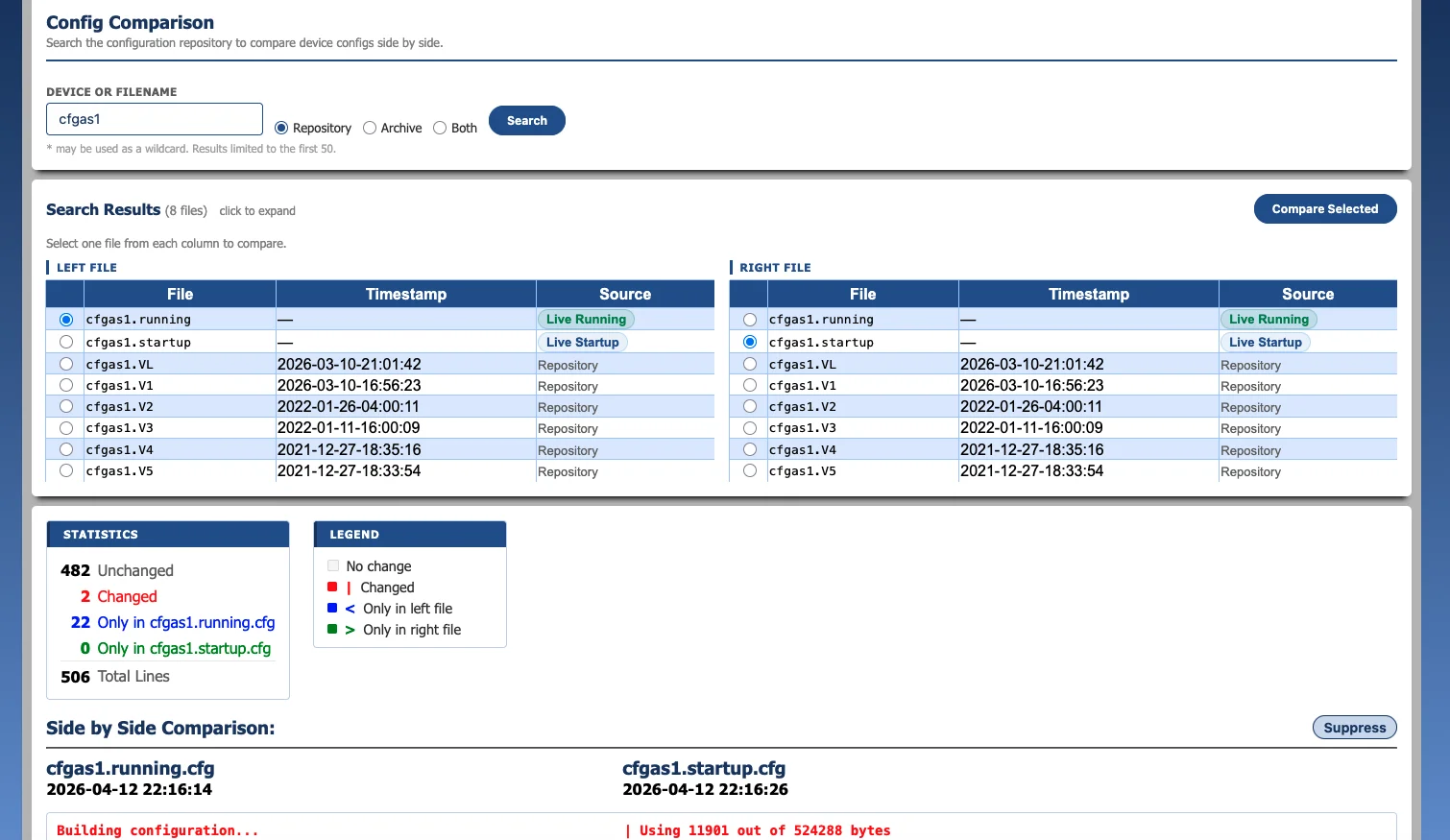
Automatically collect and version network configurations via SSH with a high-performance C++ polling engine. Maintain full version history, search across all stored configurations, and compare any two versions side-by-side with highlighted diffs. Archive configurations for long-term retention.

Side-by-side configuration comparison with highlighted differences

Change Assurance

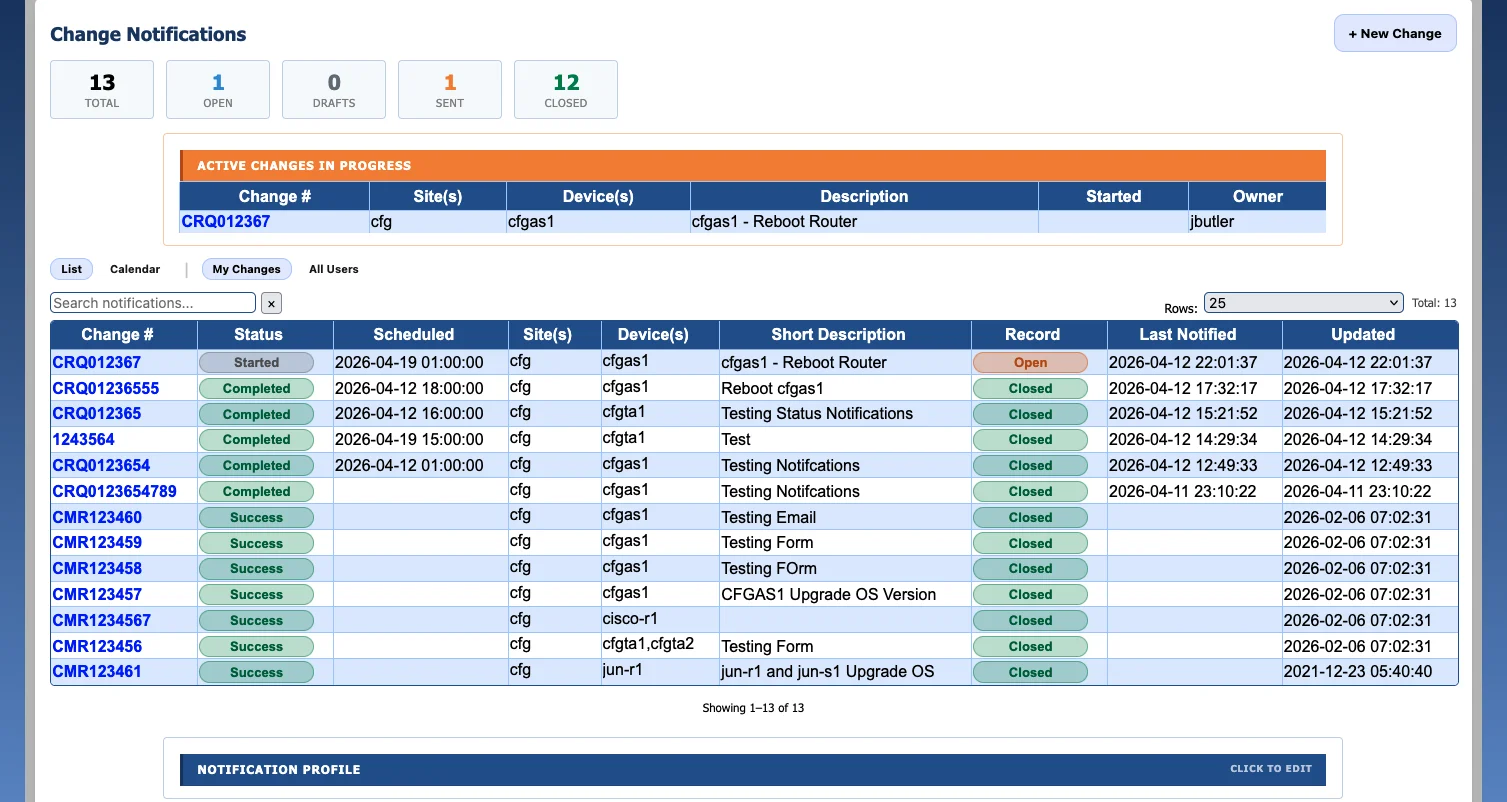
The flagship capability that sets ConfigGuard apart. Three pillars working together: ITIL-aligned change classification that automatically tags each detected change as Standard, Normal, Emergency, or Unauthorized and links it to the Change Request or Incident; full-lifecycle change notifications covering Scheduled, Started, Completed, Backed Out, and Failed with stakeholder email distribution; and pre/post validation with side-by-side configuration diffs and interface, ARP, MAC, route, and VLAN tile views that prove what actually changed. Backed by automatic Maintenance status flagging and blast radius analysis with exportable SVG maps and PDF reports.
Change notification with full lifecycle timeline and stakeholder notifications

Network Discovery

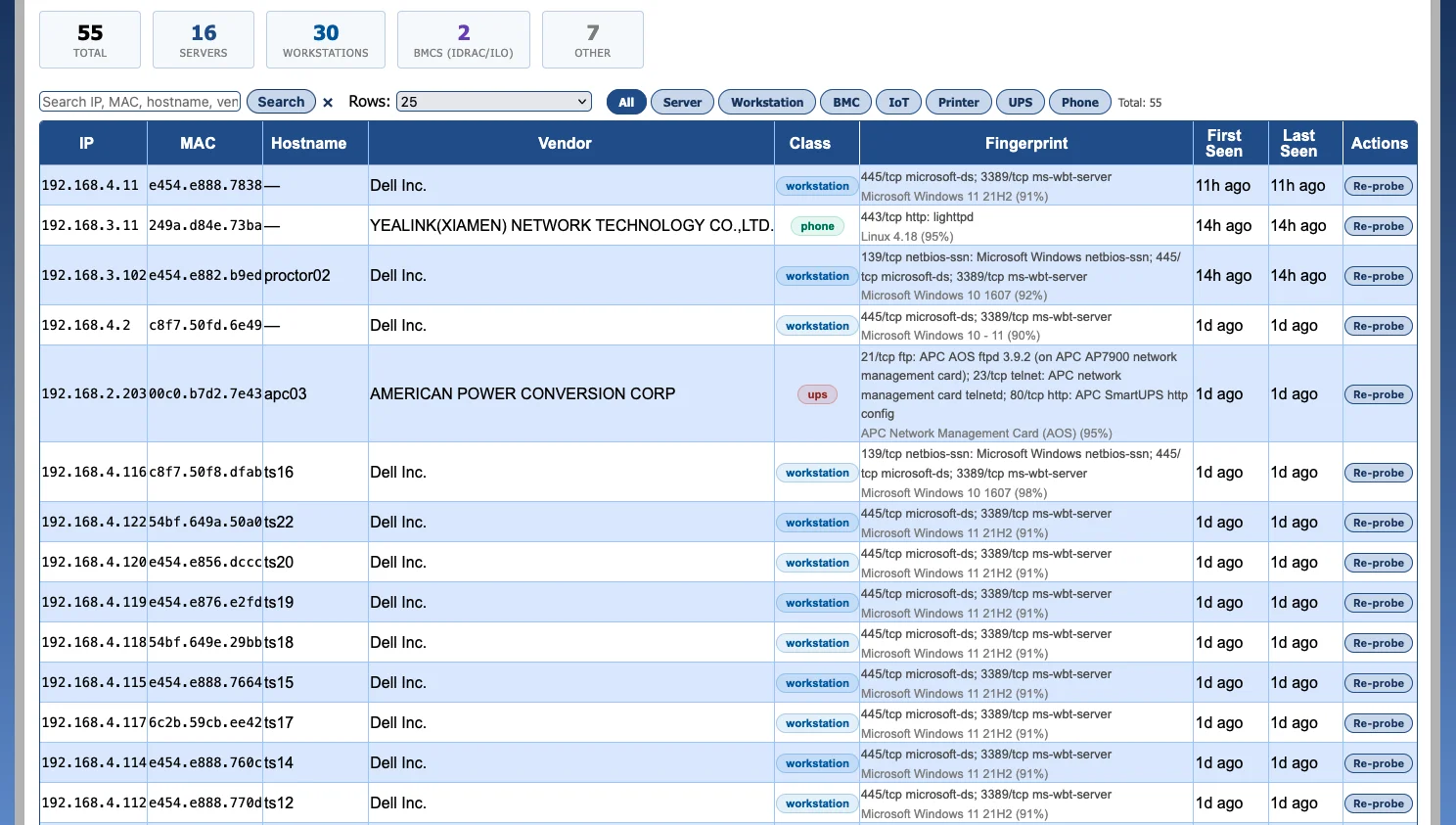
Discover your network automatically using SSH-based CDP and LLDP neighbor walking. Build topology maps from discovered neighbor relationships, surface unknown or unexpected devices, and maintain a continuously updated view of what is connected to your infrastructure. Asset Discovery extends this to non-network hosts — servers, BMCs (iDRAC, iLO), printers, IP phones, IoT, and workstations — auto-classified and fingerprinted with MAC, OUI vendor, open ports, and OS guess.

Asset discovery results with auto-classified non-network hosts — servers, BMCs, workstations, UPS, IP phones — fingerprinted by OUI vendor, open ports, and OS guess

Operational Awareness

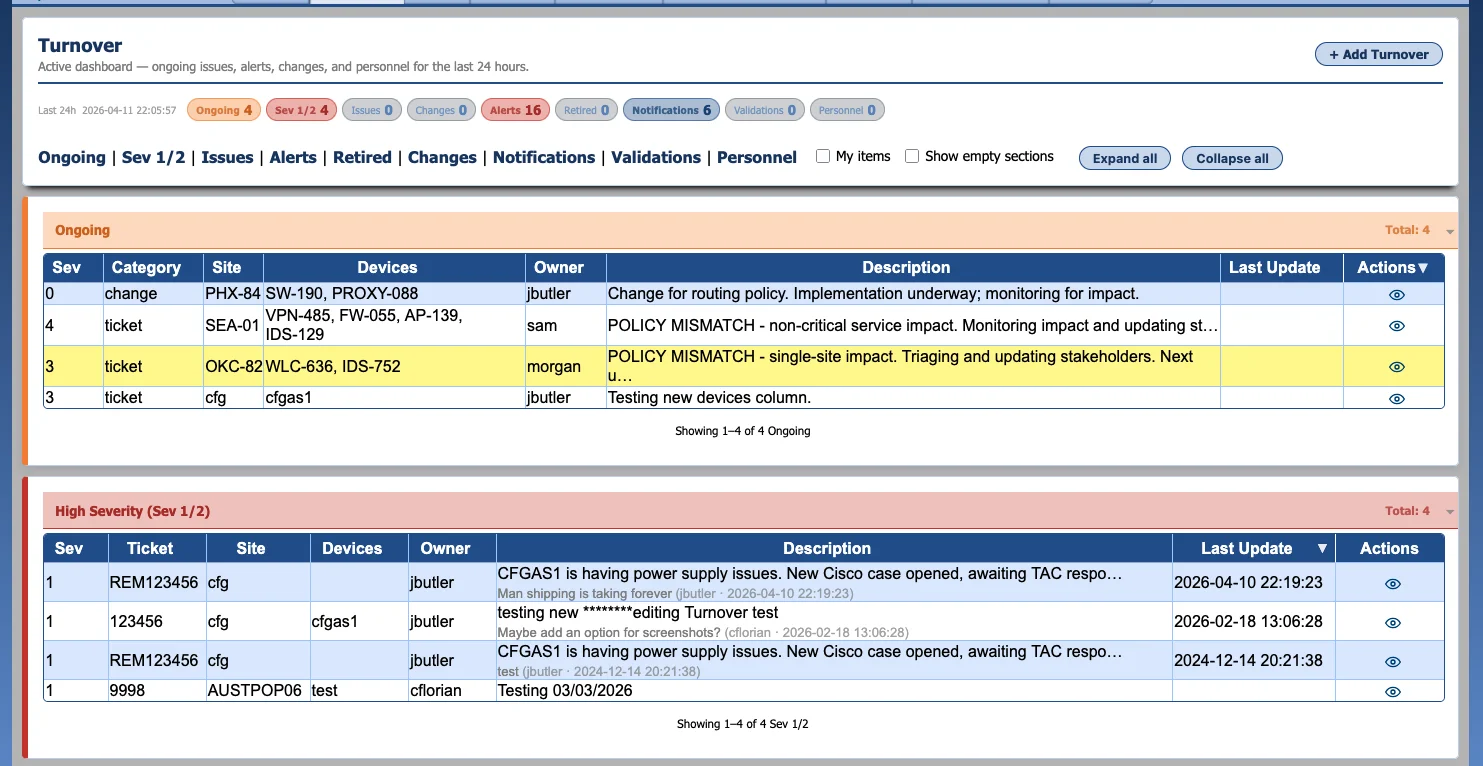
Start every shift with a clear operational picture. The status dashboard surfaces critical KPIs with color-coded health indicators. The turnover dashboard provides a 24-hour operational view of ongoing issues, recent changes, and device alerts. Automated daily email reports keep the entire team informed.

Turnover dashboard showing 24-hour operational view with ongoing issues and device alerts

Plus the operational fundamentals every network team relies on

See All 10 Feature Categories

Why Enterprise Teams Choose ConfigGuard

Concrete operational outcomes — not just feature checklists.

Reduce Mean Time to Resolution

Stop manually correlating data across multiple tools when something breaks. ConfigGuard tells you exactly what changed and where the impact landed — in one view, in seconds — so your team gets to root cause faster.

Strengthen Change Assurance

Validate each tracked change by comparing critical network state before and after execution — not just the configuration that was typed. Catch silently-dropped routes, missing VLANs, and reachability regressions inside the change window. The Change Register classifies each detected change per ITIL — Standard, Normal, Emergency, or Unauthorized — and surfaces the changes nobody filed paperwork for as a first-class metric.

Improve Operational Confidence

Know the operational impact of changes across your environment, not just at the configuration level. Sleep better between change windows; arrive Monday morning knowing the weekend maintenance landed clean.

Support Audit & Compliance Requirements

Provide verifiable, historical evidence of network state and change activity. Reconstruct conditions at any point in time for auditors, security investigations, and outage RCA — with deterministic, traceable analysis, not opaque scoring.

Built for Regulated Environments

ConfigGuard is designed for organizations where network changes carry real consequences — and where auditors expect proof, not promises.

Defense & Government

On-premise deployment with no required cloud services. Configuration data stays inside your perimeter. Modern authenticated encryption, MFA, RBAC, and full audit logging.

Healthcare

Supports controls aligned with HIPAA Security Rule requirements for network infrastructure carrying PHI. Access controls, audit trails, and encrypted credential storage.

Enterprise & Critical Infrastructure

ITIL-aligned change management workflows, NIST CSF control mapping, and automated compliance documentation. ConfigGuard supports your compliance posture — your audit team validates the rest.

Know What Changed. Know What It Affected. Know Before It Matters.

Stop guessing. Stop correlating across multiple tools. Start understanding your network — before and after every tracked change.

Request a Demo